What Warehouse AI Teams Actually Annotate
AMR Navigation, Robotic Picking, Safety Analytics, and Inventory Scanning
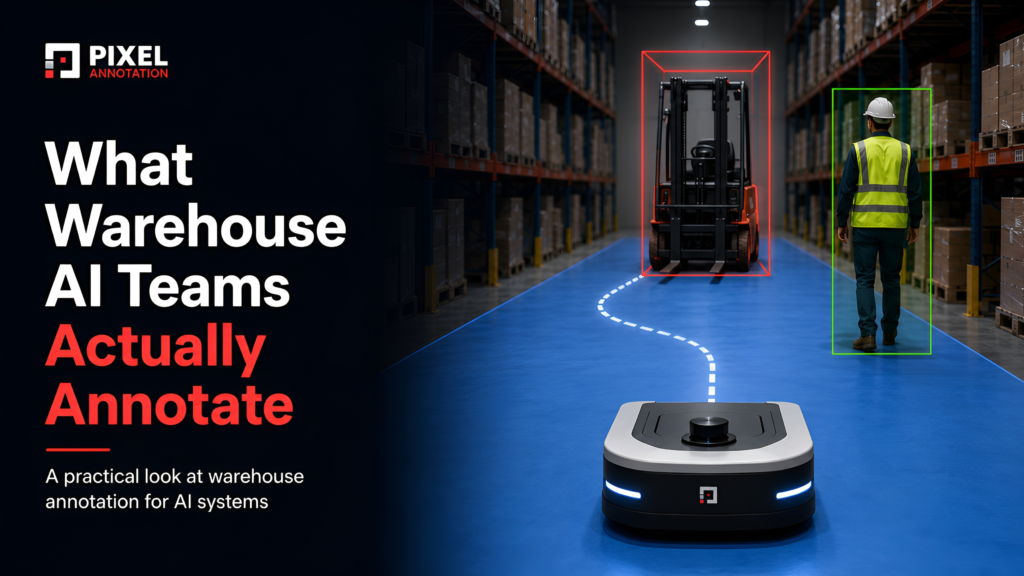
A pallet does not mean the same thing to every warehouse AI system.
To an autonomous mobile robot, it is a 3D obstacle with a position, size, and direction. To a picking robot, it may be part of the background beneath the products. To a safety system, it can become a hazard when it blocks a pedestrian path. To an inventory drone, it may only matter because its presence confirms that a rack slot is occupied.
The physical object has not changed. The decision being made about it has.
This is where warehouse computer vision annotation becomes more complicated than it first appears. Navigation, picking, safety, and inventory systems often operate inside the same facility and observe many of the same objects. Yet each system needs those objects labelled differently.
Teams that treat warehouse AI as one large annotation project usually discover the problem late. The ontology works for the first model, but the next system needs different boundaries, attributes, temporal information, or export formats.
A better approach is to separate warehouse annotation into four clear label contracts.
The four warehouse annotation systems
Most warehouse annotation tasks for warehouse automation fall into four production systems:
- AMR navigation: 3D cuboids, drivable-floor masks, obstacle classes, and persistent tracking IDs.
- Robotic picking: instance masks, amodal boundaries, object pose, grasp points, and pick outcomes.
- Safety analytics: tracked workers and vehicles, PPE attributes, zones, pose keypoints, and temporal events.
- Inventory scanning: label detection, OCR transcription, slot occupancy, case counts, and warehouse-management-system reconciliation.
These systems may share cameras, footage, and object classes. They should not automatically share annotation rules.
The right place to begin is not with the question, “What objects are visible?”
It is:
– What decision must the model make from this data?
An autonomous mobile robot needs to decide where it can move. A picking system needs to decide which item it can grasp. A safety model needs to decide when an interaction becomes dangerous. An inventory system needs to decide what is present in a rack location.
Once that decision is clear, the annotation requirement becomes much easier to define.
1. AMR navigation needs geometry, free space, and movement
Autonomous mobile robots must understand the warehouse as a changing 3D environment.
They need to recognise fixed structures, temporary obstacles, moving workers, forklifts, carts, pallets, and anything else that may affect the robot’s route. Good autonomous mobile robot training data normally combines camera images, depth data, LiDAR point clouds, and video, requiring different forms of image annotation depending on the perception task.
The main annotation tasks are:
- 3D cuboids around obstacles
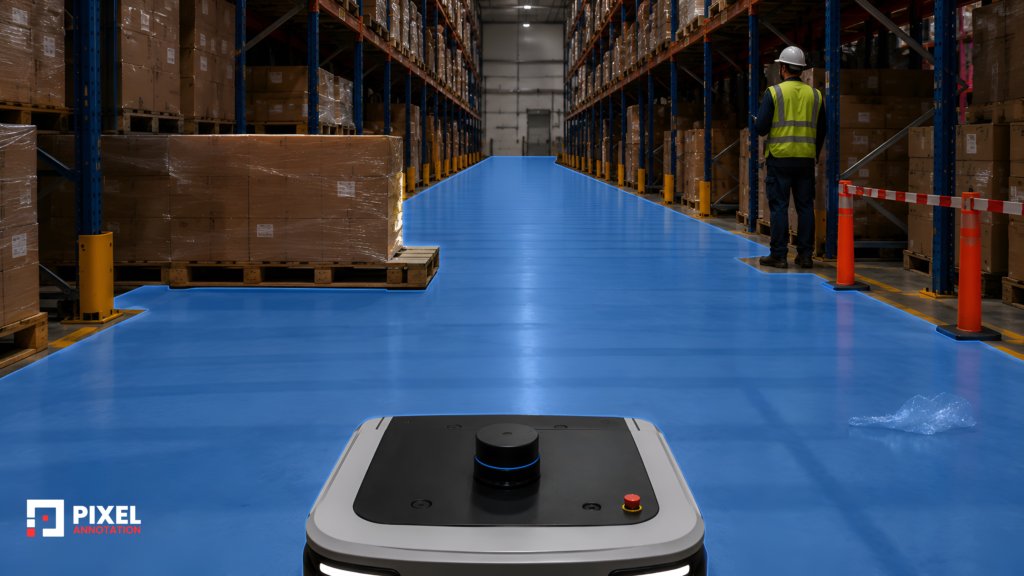
- Free-space or drivable-floor segmentation
- 2D boxes for camera-based perception
- Persistent tracking IDs for people and moving equipment
Each task answers a different navigation question.
– 3D cuboids describe where an obstacle exists
A 2D box confirms that an object is visible. 3D cuboid annotation gives the model its location, dimensions, orientation, and position relative to the robot.
Warehouse cuboid classes commonly include workers, forklifts, pallets, hand pallet trucks, carts, stillages, and small load carriers.
The difficult part is rarely drawing a box around a clean object. It is deciding what the cuboid should contain when the object is partially visible or physically connected to something else.
Consider a loaded pallet wrapped in plastic. Should the cuboid cover only the wooden pallet or the complete load? For navigation, the robot must avoid the entire structure, so labelling only the pallet base would underestimate the obstacle.
Forklifts create similar problems. Their forks may extend well beyond the main body, sometimes close to the floor where they are difficult to see in an image. If one annotator includes the forks and another does not, the model receives two different definitions of the same vehicle.
Practical guidelines should settle questions such as:
- Whether raised and lowered forks are included
- How wrapped pallet loads are treated
- When stacked pallets become one obstacle
- How to label objects with sparse LiDAR points
- Whether temporary equipment belongs to an existing class or an “other obstacle” class
These are not minor annotation details. They change the geometry the model learns.
Teams searching for a pallet detection dataset LiDAR setup often focus first on the number of point clouds available. In practice, the more important issue is whether cuboid orientation, pallet-load boundaries, occlusion, and stack-height rules are applied consistently.

– Free-space masks define where the robot may travel
Obstacle detection explains what the robot should avoid. Free-space semantic segmentation explains where the robot can safely move.
At first glance, warehouse floors seem easy to annotate. In real footage, several surfaces can look like obstacles or open space depending on lighting and camera angle.
Annotators regularly encounter:
- Strong rack shadows
- Reflections from polished floors
- Dark spill marks
- Painted safety lanes
- Temporary staging areas
- Loose plastic wrapping
- Pallets extending into the aisle
- Raised dock edges and floor-level barriers
A shadow should not become an obstacle simply because it is dark. A transparent sheet on the floor should not become free space simply because the concrete remains visible underneath it.
This is where contextual judgement matters. The annotator must understand not only what is visible, but whether the robot can physically travel through that area.
Clean warehouse footage rarely represents peak operations. Once cartons, temporary pallets, workers, wrapping material, and moving equipment enter the same aisle, the free-space problem changes completely.
– Tracking IDs help the robot predict movement
A person detector tells the robot that someone is present. A tracking ID tells it that the person in the current frame is the same person seen in previous frames.
That continuity allows the system to estimate direction and speed.
Without stable tracks, the robot may detect a worker in every frame but still fail to understand whether the worker is:
- Crossing its route
- Walking away
- Standing still
- Turning into the aisle
- Reappearing after an occlusion
Tracking becomes difficult when workers cross paths, move behind racks, are blocked by forklifts, or wear similar high-visibility clothing.
The quality review therefore needs to examine sequences, not isolated frames. A box can be accurate in every frame while the identity changes incorrectly halfway through the track.
An AMR dataset with strong detection labels but unstable IDs trains a robot that can see people without reliably anticipating them.

2. Robotic picking needs object boundaries and interaction labels
Robotic picking is usually the most annotation-intensive warehouse system.
Navigation models repeatedly encounter a controlled list of classes such as workers, forklifts, carts, and pallets. Picking systems may face thousands of product shapes, colours, materials, packaging types, and damage conditions.
A bin that looks simple to a person may contain overlapping products, transparent packaging, reflective surfaces, folded cartons, soft bags, and items partly buried beneath others.
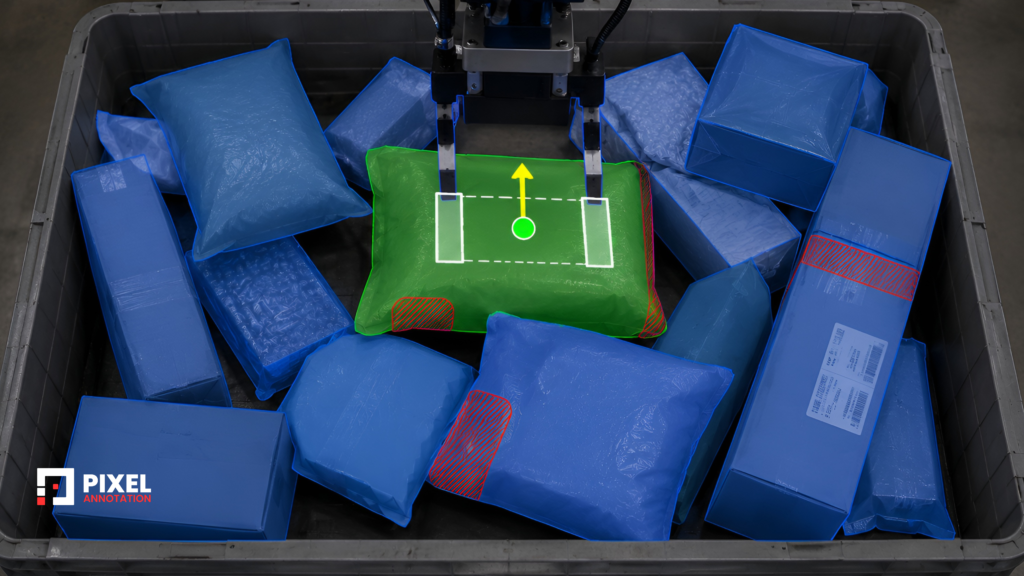
The main bin picking annotation tasks include:
- Instance segmentation masks
- Amodal object boundaries
- Six-degrees-of-freedom object pose
- Grasp or suction points
- Pick-outcome labels
– Instance masks separate objects inside clutter
Bounding boxes are often too broad for robotic picking.
When products touch or overlap, two boxes may cover almost the same area. A grasp planner needs the actual visible boundary of each object so it can estimate where one item ends and the next begins.
Instance segmentation annotation provides a separate mask for every item.
What makes this challenging is that product boundaries are not always clear. Transparent wrapping can disappear against the background. Black packages can merge visually with dark bins. Soft packaging can fold into irregular shapes. Two cartons with similar colours may appear to be one object.
Annotation policies must also match the model’s purpose.
A product-identification system may need a detailed SKU taxonomy. A general picking system may need only one class, such as “pickable_object”, with a separate mask for each item.
Adding more product classes does not automatically improve the dataset. It can create unnecessary complexity when the model only needs to understand object separation.

– Amodal annotation captures hidden object extent
A visible mask covers the part of the object that the camera can see.
An amodal mask estimates the object’s complete shape, including the area hidden beneath other products. This can help the robot reason about the likely object boundary before selecting a grasp.
The challenge is obvious: annotators are being asked to label pixels that are not visible.
Without a clear policy, one annotator may assume that a hidden box continues in a straight line, while another may estimate a smaller or angled shape. Both may appear reasonable.
A reliable workflow normally separates the tasks:
- Annotate the visible object boundary.
- Estimate the complete amodal boundary.
- Add an occlusion-level attribute.
- Escalate heavily hidden objects for experienced review.
Reference examples are especially important. Annotators need to see how the project treats common shapes such as cartons, bottles, pouches, trays, and irregular consumer goods.
The aim is not perfect reconstruction. It is consistent inference.
– Object pose is valuable when the SKU set is controlled
Some picking cells handle a limited range of known parts or products. These systems may require 6-DoF pose annotation, covering x, y, and z position together with roll, pitch, and yaw.
The pose is often created by aligning a known 3D model with the object visible in the image or point cloud.
This is useful in kitting, machine tending, industrial assembly, and controlled picking environments, where manufacturing annotation can help create the precise training data required when exact orientation affects the tool path.
A general fulfilment centre may face a constantly changing product catalogue. In that case, producing detailed pose labels for every item may be expensive without adding enough value. Instance masks and grasp-point labels may be more practical.
The annotation type should follow the picking architecture. It should not be selected simply because more detailed labels sound better.
– Grasp labels move beyond object recognition
A correct object mask tells the robot where an object is. It does not necessarily tell the robot how to pick it up.
A grasping dataset may include:
- Suction points
- Parallel-jaw grasp rectangles
- Grasp direction
- Surface suitability
- Fragility attributes
- No-grasp regions
A suction point should avoid folded packaging, loose plastic, perforated surfaces, sharp edges, labels that may peel away, and areas with strong curvature.
A parallel gripper needs enough clearance around both sides of the object. A visually accessible point may still be physically unreachable because another product blocks the gripper.
This is where annotation becomes task-specific. The annotator is no longer only describing what appears in the image. They are describing how the robot should interact with it.
– Pick-outcome labels connect the dataset to production
One of the most valuable label families is generated after the robot attempts the pick.
Each attempt can be marked as:
- Successful
- Failed grasp
- Wrong object selected
- Multiple items picked
- Dropped during transfer
- Product damaged
- Placement failure
The outcome should then be linked back to the pre-pick image and annotation.
This allows the team to identify which visual conditions produce failures. The issue may not be mask quality. It may be heavy occlusion, reflective packaging, an unstable stack, a poor suction surface, or an object trapped beneath another product.
Geometry gets a picking model into a demonstration. Outcome labels help it survive production.
3. Safety analytics needs trajectories and events, not just boxes
Warehouse safety systems observe many of the same classes as AMR navigation: workers, forklifts, carts, pallets, dock areas, and restricted zones.
The difference is in the question being asked.
The AMR needs to avoid a collision. The safety system needs to understand when an interaction became risky, whether a rule was broken, and how the event developed over time.
A complete warehouse safety video annotation workflow may include:
- Person and vehicle tracking
- PPE attributes
- Zone polygons
- Pose keypoints
- Temporal event segments
– A near miss cannot be understood from one frame
Imagine a worker and forklift appearing close together in an image.
That frame alone does not tell us whether the situation is dangerous. The forklift may be parked. The worker may be moving away. A physical barrier may separate them.
A near miss is normally a relationship between two trajectories.
The annotation may require:
- A persistent worker ID
- A persistent vehicle ID
- Their positions across time
- A defined interaction or safety zone
- An event class
- A clear start and end frame
Possible event classes include pedestrian-in-path, missed stop, unsafe crossing, forklift inside a restricted zone, worker beneath a raised load, or unsafe dock movement.
The start frame matters as much as the peak moment. If annotators mark only the frame where the worker and forklift are closest, the model may learn to recognise danger after it has already developed.
Reviewers should therefore examine the full event window, including the frames before and after the incident.
– PPE labels need an unknown state
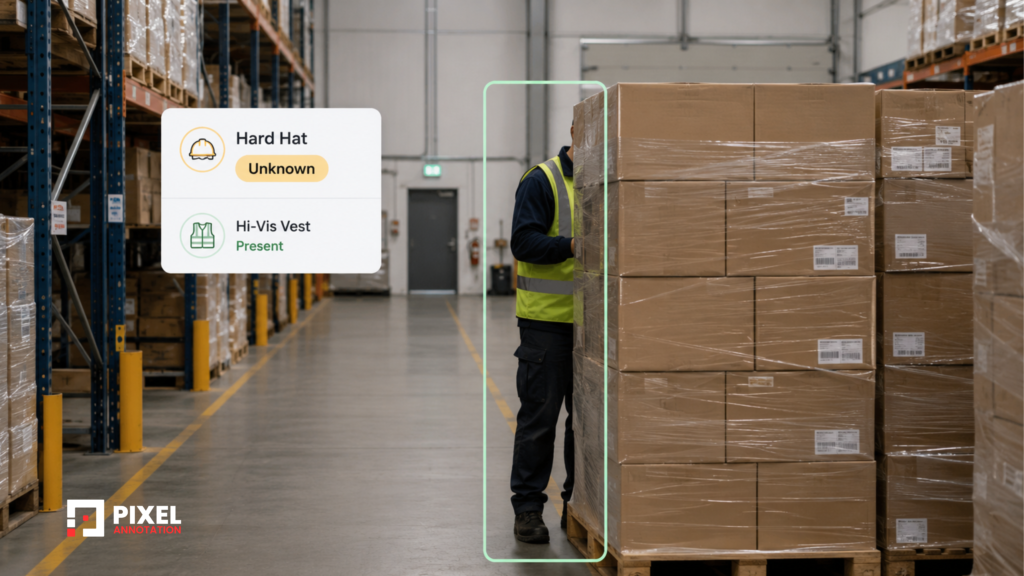
PPE compliance is often handled as attributes attached to a person track.
Examples include:
- High-visibility vest: present, absent, or unknown
- Hard hat: present, absent, or unknown
- Gloves: present, absent, or unknown
- Safety footwear: present, absent, or not visible
The unknown option prevents occlusion from becoming a false violation.
A helmet hidden by a rack beam should not automatically be marked absent. Similarly, footwear should not be labelled non-compliant when the lower body is outside the camera view.
Simple yes-or-no attributes can create noisy data when visibility is not considered.
– Pose keypoints need action context
Pose keypoints can support ergonomic-risk analysis by showing body posture during lifting, carrying, bending, or reaching.
But keypoints alone do not explain the complete situation.
The system may also need to know:
- Whether the worker is lifting or placing
- Where the load is positioned
- Whether one or both hands are involved
- How long the posture is maintained
- Whether the motion is repeated
A worker bending briefly to inspect an object is not the same as repeatedly lifting heavy cartons with an unsafe posture.
This is why ergonomic annotation often combines keypoints with action labels and temporal segments.

– Worker privacy belongs inside the annotation workflow
Safety footage contains identifiable employees, daily routines, work locations, and behavioural data.
Privacy controls should be defined before annotation begins. They may include face blurring, restricted user access, retention limits, audit logs, secure transfer, and clear reviewer permissions.
Once hundreds of hours of identifiable footage have been distributed across an annotation workflow, privacy cannot be fixed by adding one final processing step.
For safety analytics, data governance is part of annotation quality.
4. Inventory scanning is an OCR problem on a robotic platform
Inventory drones and scanning robots may look like advanced robotics systems, but much of their annotation work resembles document processing.
The system must locate labels, read text accurately, determine rack occupancy, and connect the observation to the correct warehouse record.
The main tasks are:
- Barcode and label detection
- OCR transcription
- Rack-slot classification
- Case counting
- Mapping results to the warehouse management system
– Real warehouse labels are rarely clean
A model may need to detect pallet labels, barcodes, licence plate numbers, lot codes, expiry dates, location codes, and product identifiers.
These appear under difficult conditions:
- Shrink-wrap glare
- Motion blur
- Rack shadows
- Angled camera views
- Small text
- Torn or dirty labels
- Rack beams covering part of the label
- Several labels visible on one pallet
A perfect box around the wrong label is still an incorrect annotation. The guideline must explain which label is operationally relevant when several codes appear in the same view.
– OCR transcription must be exact
OCR annotation normally includes polygon annotation around the text region and a character-for-character transcription.
Fields may include:
- LPN
- SKU
- UPC
- Lot number
- Expiry date
- Quantity
- Rack location
The review process should treat region accuracy and transcription accuracy as separate checks.
One reviewer may confirm that the polygon fits the label correctly but miss that B8O1 was entered as B801. The characters look similar, but the mistake may connect the image to the wrong inventory record.
For lot numbers and expiry dates, a one-character error is not a small accuracy loss. It can become an operational or compliance issue.

– Occupancy requires rack-level context
Rack slots may be labelled as empty, partially occupied, fully occupied, blocked, or unknown.
The visual decision can still become difficult. A pallet may appear to belong to one slot while physically sitting in the location behind it. A rack beam may hide part of a load. A slot may be occupied but contain the wrong SKU.
This is why occupancy labels usually need to be linked with:
- Rack coordinates
- Camera or drone position
- Warehouse location IDs
- WMS records
- Capture timestamps
Accurate visual annotation attached to the wrong rack location is still incorrect data.
Inventory scanning is best understood as an OCR and reconciliation workflow delivered through a robotic camera system.
The 4-System Warehouse Annotation Map
The systems can be summarised through the labels they consume:
| Annotation type | AMR navigation | Robotic picking | Safety analytics | Inventory scanning |
| 2D bounding boxes | Core | Secondary | Core | Core |
| 3D cuboids | Core | Secondary | — | — |
| Instance masks | Secondary | Core | — | — |
| Free-space segmentation | Core | — | Secondary | — |
| Tracking IDs | Core | — | Core | — |
| Pose keypoints | — | — | Core | — |
| Temporal event segments | — | Secondary | Core | — |
| 6-DoF pose and grasp points | — | Core | — | — |
| OCR transcription | — | — | — | Core |
| Attributes and classifications | Secondary | Core | Core | Core |
Read the map vertically and each column becomes a practical annotation scope.
Read it horizontally and reuse becomes visible. Bounding boxes can support several systems. Tracking IDs can serve both navigation and safety. Attributes appear across picking, safety, and inventory.
But reuse only works when the definitions remain compatible.
Shared labels can reduce annotation cost. Shared ambiguity usually creates rework.
One warehouse glossary, four label contracts
Warehouse teams need a shared physical glossary.
Everyone should agree on what counts as a pallet, stillage, tote, cart, rack, forklift, or hand pallet truck. Without that foundation, different teams may use different names for the same object. But a shared glossary should not become one universal annotation rule.
Consider the word pallet.
For an AMR, it may be:
– A 3D obstacle that includes the load when the complete structure affects navigation.
For a picking robot:
– A background object that must not be included inside product instance masks.
For a safety system:
– An object that becomes relevant when it blocks a walkway or changes a safe zone.
For inventory scanning:
– Evidence that a rack location is occupied.
The noun remains the same. The annotation contract changes.
A reliable structure is therefore:
- Maintain one shared warehouse glossary.
- Create a separate label contract for each production system.
- Add system-specific edge-case examples.
- Define separate quality targets for each annotation task.
- Measure agreement at the task level, not across the entire warehouse dataset.
A high agreement score on person boxes does not prove that annotators agree on pallet cuboid orientation, amodal product boundaries, or the start frame of a near miss.
Quality should be measured where disagreement actually occurs.
Where warehouse annotation projects usually go wrong
Most expensive failures in annotation in warehouse environments do not begin with poor drawing. They begin with unclear decisions.
The first ontology becomes the permanent ontology
Navigation is often the first system deployed, so its class list becomes the default for every later project.
The safety team inherits obstacle classes. The picking team inherits object boundaries. The inventory team inherits names that have little connection to rack occupancy or text fields.
The answer is not to keep adding classes to one increasingly complicated ontology. The shared glossary should remain stable, while each system receives its own contract.
Guidelines are written before difficult frames are reviewed
A clean pilot may hide the real work.
The project reaches production before anyone decides how to treat extended forklift forks, stacked pallets, transparent packaging, mirrored workers, damaged labels, or partially visible rack slots.
Once thousands of frames have been labelled, each new rule can create a re-annotation pass.
The pilot should deliberately include difficult samples. Edge cases should be used to write the guideline, not discovered after the guideline has already been approved.
Export requirements are left until the end
Annotations may look correct inside the tool but still fail inside the training pipeline.
Common problems include:
- Missing track IDs
- Incorrect coordinate systems
- Incomplete sensor calibration
- Attributes stored in unusable fields
- Event labels without clear frame references
- OCR transcriptions disconnected from rack IDs
A small end-to-end export should be tested before full production. Ten correctly exported examples can reveal more than thousands of annotations reviewed only inside the platform.
The standard format should follow the model pipeline. COCO JSON may suit masks and keypoints, YOLO text may suit lightweight detection, KITTI-style structures may suit 3D cuboids, MOT format may suit tracking, and OCR projects often require custom JSON linked to warehouse records.
Pre-labeling is treated as finished annotation
Segmentation and detection models can reduce manual work, particularly for repeated objects and clear scenes.
They do not remove the need for human verification.
Pre-labels may merge touching products, split reflective packaging, miss thin forklift forks, switch tracking identities, or treat shadows as obstacles.
Automation changes the work from drawing to reviewing and correcting. The quality challenge remains.
More data is collected instead of better edge cases
Warehouse teams often ask how many annotated images they need.
For a controlled detector, the first useful model may be trained with tens of thousands of well-selected frames. After that point, repeating clean aisle scenes adds less value than finding the situations where the model fails.
Useful hard samples may include:
- Low-light aisles
- Reflective packaging
- Crowded intersections
- Heavily occluded products
- Damaged barcodes
- Unusual pallet shapes
- Workers partly hidden by equipment
- Temporary layout changes
The goal is not to label the largest possible dataset. It is to cover the conditions the production model must survive.
What data do warehouse robots train on?
The answer depends on the robot’s production role.
Navigation robots train on camera images, depth data, LiDAR point clouds, free-space masks, 3D cuboids, and tracked people. Picking robots train on object masks, amodal boundaries, pose, grasp points, and pick outcomes. Safety systems train on trajectories, PPE attributes, zones, keypoints, and temporal events. Inventory robots train on label detection, OCR transcription, occupancy, and rack-level records.
This is why warehouse AI training data should not be described as one broad dataset. A warehouse may contain shared visual objects, but each system consumes a different representation of those objects.
How many images to train a warehouse detection model?
There is no useful volume estimate until the model scope is clear.
A detector with five stable classes and fixed camera views may reach a useful stage with tens of thousands of carefully selected frames. A picking model facing changing products, heavy occlusion, and reflective packaging may require a much broader dataset.
The more useful questions are:
- How many classes are involved?
- How often does the scene change?
- Are the cameras fixed or moving?
- How much occlusion is present?
- Are rare safety events included?
- Does the dataset cover lighting, packaging, layout, and seasonal variation?
- Are production failures being returned to the annotation queue?
Large warehouse automation datasets can still fail when they contain thousands of near-duplicate clean frames but very few difficult situations.
Coverage matters more than raw volume after the first training cycles.
Scope the decision before estimating the volume
A practical warehouse annotation plan should define seven things before the team estimates annotation volume:
- The production system consuming the data
- The decision the model must make
- The labels and attributes required to support that decision
- The difficult cases that must appear in the pilot
- The export format expected by the training pipeline
- The quality method for each task
- The feedback loop for bringing production failures back into the dataset
Once these are clear, the number of frames becomes easier to estimate.
Without them, a volume target is only a large number attached to an unclear problem.
A team may annotate 100,000 warehouse images and still discover that the dataset lacks stable tracks, exact OCR transcription, pick outcomes, or the event boundaries the model actually needs.
The annotation plan should be built around the model’s decision, not around the amount of data available.
The warehouse is shared. The annotation language should not be.
Warehouse AI systems operate around the same racks, pallets, workers, products, cameras, and vehicles. That overlap makes it tempting to treat all warehouse data as one dataset.
In practice, each system sees a different problem.
Navigation needs geometry, drivable space, and trajectories. Picking needs object boundaries, interaction points, and outcomes. Safety needs relationships across time. Inventory scanning needs exact transcription and rack-level reconciliation.
The strongest warehouse automation datasets are not created by labelling everything visible in the frame. They are created by understanding what each system must decide and writing the annotation contract around that decision.
One warehouse may support four AI systems.
It should not force all four to speak the same annotation language.