Beyond Object Detection: The Geometry Decisions Behind LiDAR Annotation
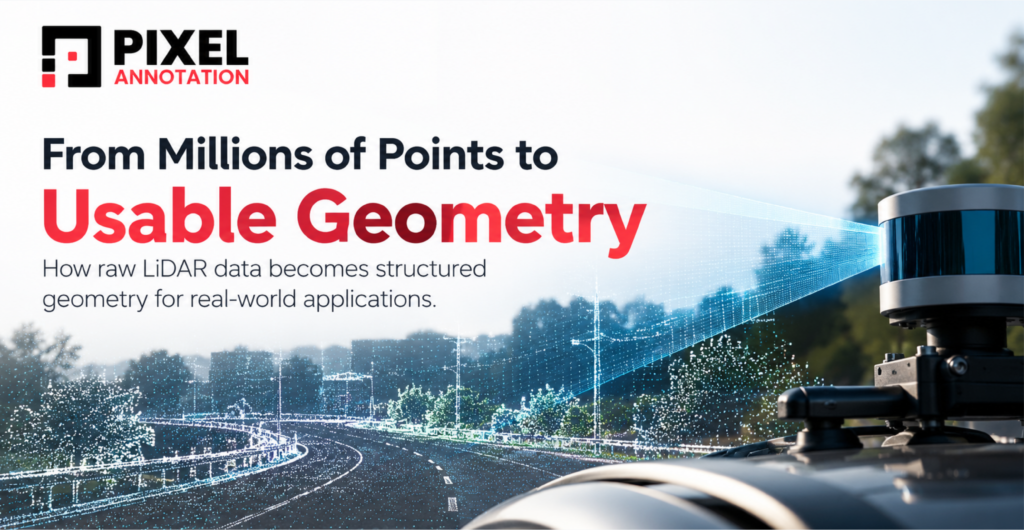
A LiDAR point cloud can look surprisingly clear on first open. The road is obvious, vehicles stand out, and a building outline runs off into the distance.
Then you try to select one structure and nothing else, and it gets harder. Some points overlap with neighboring objects. Parts of the structure vanish behind occlusions. Something that looks continuous from one angle looks broken from another. Even a selection that seems clean can pull in background points you never meant to include.
That is the real work of LiDAR annotation. Recognizing what’s in the scene is the easy part. The harder part is deciding exactly which points belong to an object, how its geometry should be read, and what the final annotation has to represent. These decisions shape the data behind autonomous driving, infrastructure mapping, robotics, and geospatial analysis, and they rarely get the attention they deserve.
1. Not Everything in a Point Cloud Fits Inside a Box
Most conversations about LiDAR data annotation start with 3D bounding boxes. For vehicles, pedestrians, and machinery, that makes sense, because a cuboid captures position, size, and orientation well.
Road barriers, curved structures, poles, fences, and vegetation are a different story. A roadside barrier that bends through several curves and elevation changes would need one box full of empty space, or many boxes that localize it but lose its real shape. The method has to match both the object and what the data will be used for.
| Method | What it does | Best for |
| 3D bounding box | Localizes an object with a cuboid | Vehicles, pedestrians, machinery |
| Semantic segmentation | Assigns a class to every point | Roads, buildings, vegetation |
| Instance segmentation | Separates individual objects within a class | Counting or tracking distinct objects |
| Polyline / geometric annotation | Traces linear features | Road edges, lane markings, barriers |
These aren’t interchangeable. A cuboid may be plenty for a vehicle detection model and still be useless for a mapping team that needs an accurate road boundary. The useful question is how much geometric detail the downstream system actually needs, and the most advanced-sounding technique may not be the answer.
2. The Boundary Problem: Where Does One Structure End?
In a 2D image, color, texture, and contrast help mark where objects end. A point cloud has none of that. Annotators work from position, height, shape, density, and how points relate to each other.
Picture a vertical pole next to a tree. From one angle they separate cleanly. From another, their points overlap, and a selection meant for the pole quietly collects some branches. The error looks fine from where you made it. Rotate the scene 90 degrees and it’s suddenly obvious.
That’s why multi-angle inspection belongs to the quality process. Annotators rotate the scene, isolate small regions, check height differences, and compare neighboring clusters before committing to a selection.
Some situations need rules rather than judgment. Fences run through vegetation. Supports join larger surfaces. Should intersection points go to one class or the other? Does a connected support count as part of the main structure? What happens when the visible evidence isn’t enough to say?
Those answers can’t change from one annotator to the next, so we settle them before production starts. Class definitions, boundary rules, and a procedure for ambiguous regions go into the guidelines, and difficult examples get reviewed together and written back into them. Without that, a project can end up with thousands of technically valid labels that describe the same structure in different ways, and the model learns the inconsistency.
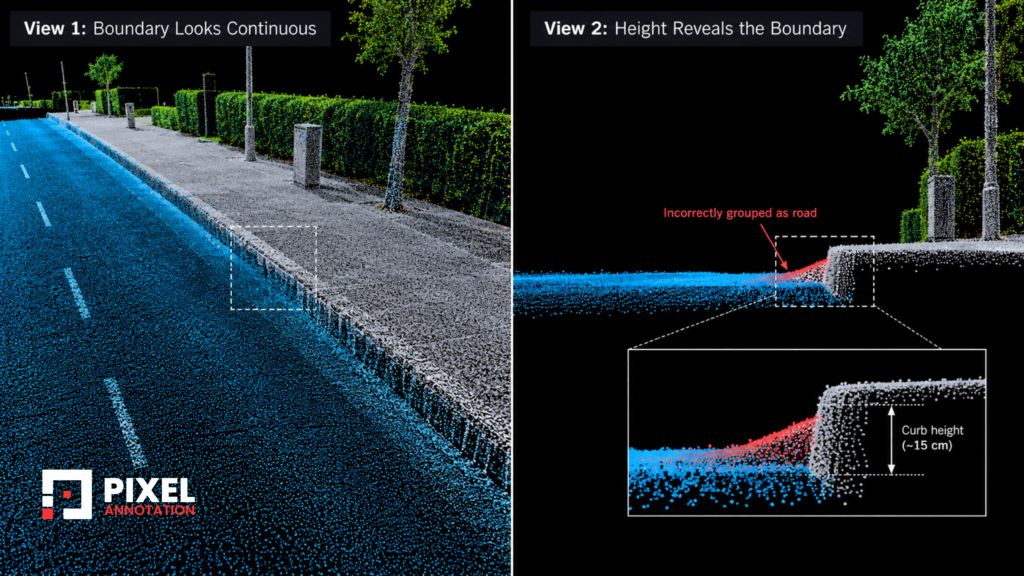
3. The Structure Is Continuous. The Points Are Not.
A point cloud is a set of sensor observations. It isn’t a complete copy of the physical world.
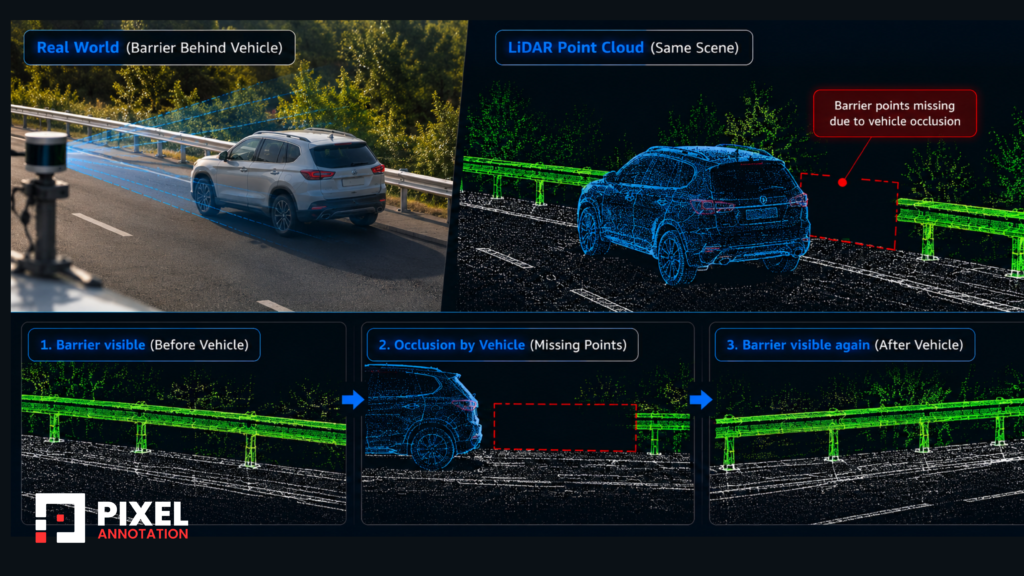
Take a metal railing along a road. In reality it’s one unbroken line. In the scan, some stretches are dense, others are scattered fragments, and some are missing. Parts were hidden behind other surfaces, returns thinned out with distance, and scanning angle and surface reflectivity changed what came back.
So what should the annotation follow: the points that were observed, or the structure that’s expected to be there?
It depends on the task.
- Point-level segmentation: label the points that exist. Don’t invent missing sections because the object “should” continue.
- Geometric reconstruction or mapping: a continuous representation may be allowed, but the rules for building it have to be written down.
Both directions carry a risk. Bridge every gap automatically and separate structures can merge into one. Treat every gap as a physical break and the result turns into fragments. We look at neighboring geometry, check the structure from several viewpoints, and rely on adjacent observations only when they give enough evidence. When doubt remains, the area is flagged for review instead of settled by assumption.
The goal is a representation the data can support, even when it isn’t the neatest-looking one.
4. Why More Points Don’t Always Make Annotation Easier
You’d expect a denser scan to be easier to work with. Often it is, but density brings its own problems.
In a dense scan with road, vegetation, power lines, and overlapping structures, individual objects are easier to recognize and harder to select cleanly. There are more neighboring points to exclude and more surfaces to catch by accident. On thin, elongated structures, a small error repeated over many sections can bend the final shape.
Sparse scans flip the problem. A small structure might be a handful of points, a distant object may barely register, and there may be too little information to define a full boundary. Dense clouds demand effort on separation, and sparse clouds demand effort on interpretation. Working faster fixes neither.
Tools like CloudCompare and dedicated 3D labeling platforms make it possible to inspect data, isolate regions, and handle complex selections. They don’t replace judgment, though. Automated and semi-automated segmentation still need a human check for stray points, missing regions, and wrong class boundaries. The efficient approach is to spend attention where geometric mistakes are most likely instead of inspecting every point equally.
5. Scale Changes the Problem: Annotating Long Corridors
Everything above gets harder when the scene isn’t a single intersection but many kilometers of road.
A corridor that long can’t be handled as one point cloud. It has to be split into tiles, and tiling creates a boundary problem of its own: a barrier that crosses a tile edge must be labeled the same way on both sides, or the break shows up later as a false gap in the structure. Tile size, overlap, and edge-handling rules need to be decided before annotators start, not after the first inconsistencies appear.
Labels also have to hold up at that scale. Storing them with the points themselves, for example in the scalar fields of LAS or LAZ files, keeps annotations tied to the data instead of floating in a separate file. And for structures that run the full length of the road, like barriers, measurements need to be taken the same way from one end to the other, which depends on shared rules rather than individual habit.
None of this shows in a single screenshot. It only appears when you annotate a long, continuous asset end to end.
6. From Millions of Points to Usable Geometry
Plenty of applications don’t need millions of classified points as the final product. The point cloud is the starting material.
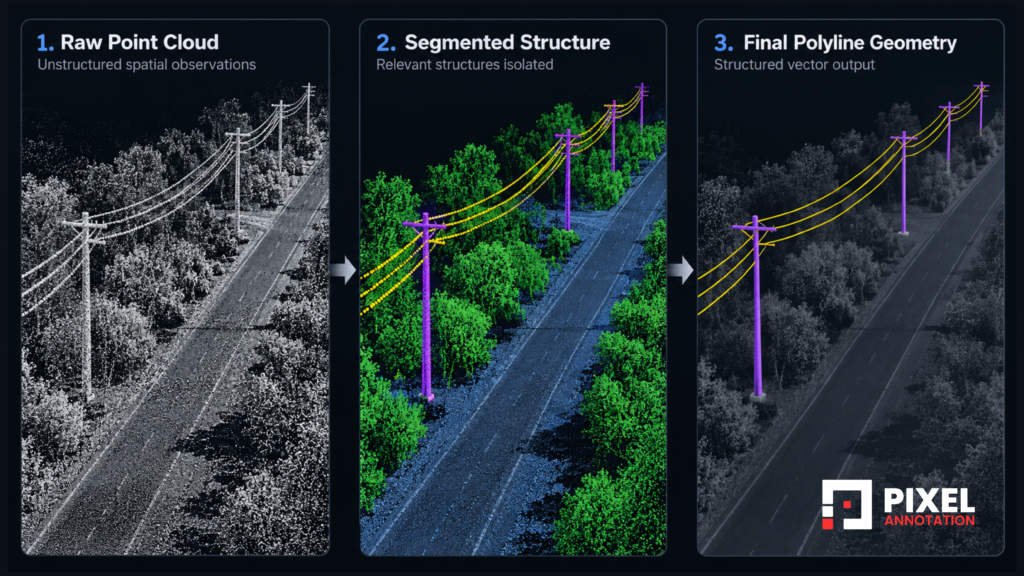
A mapping system might need a polyline for the edge of a road. An infrastructure team might need the position of a linear asset. A robot might work from a simplified model of its surroundings. Interpreting the points and producing the final geometry are related but separate tasks.
Consider a curved roadside boundary made of thousands of points. First you identify which points belong to it. Then you work out how they form one continuous feature. Then you decide how to represent it without losing real changes in direction or elevation. Connect every point and you add noise. Use too few and you smooth away curves that matter.
That tradeoff between simplicity and accuracy is why the final deliverable has to be settled at the start. If the output is a vector feature, the team needs to agree on how segments connect, whether elevation is preserved, how intersections are handled, and which coordinate reference system applies. LAS and LAZ commonly carry the point data, while vector outputs often use Shapefile or GeoPackage.
A correctly formatted file isn’t necessarily correct geometry. It can still hold misplaced features, disconnected lines, unintended intersections, or over-simplified curves. In geometry-sensitive work, a few wrong points can matter more than thousands of right ones elsewhere.
7. What Quality Control Looks Like When There Is No Perfect View
Reviewing a 3D annotation is nothing like checking a 2D bounding box annotation. An annotation can look right from above and still include unwanted points along its vertical edges. A structure can look complete from the side and show gaps from another angle. A single viewpoint is rarely enough.
In our QA process, we review each annotation against five separate questions:
Our QA checks
- Boundary accuracy: are the selected points part of the intended structure, or have neighbors crept in?
- Completeness: have all clearly visible portions been captured, including small or partly occluded sections?
- Geometric consistency: does the annotation keep the shape, orientation, and continuity the project rules define?
- Class consistency: are similar structures labeled the same way across regions and annotators?
- Output validity: does the final file follow the expected structure, coordinate system, and geometric requirements?
These overlap but aren’t the same. A cluster can have the right class and still contain points from a nearby object. A polyline can follow the right structure and still be connected wrongly at an intersection. A single accuracy percentage hides all of that.
So we categorize errors and re-inspect the usual trouble spots: intersections, thin structures, occluded sections, distant objects, and borders between closely placed classes. We also treat repeated disagreement as a signal about the guidelines. When different annotators keep reading the same junction differently, the cause is more likely an incomplete rule than individual performance, and fixing it there stops the error from spreading into later batches.
8. Why This Matters Beyond One Project
In autonomous driving, perception systems have to interpret vehicles, pedestrians, road surfaces, roadside structures, and obstacles in a changing environment. A bounding box helps a model localize a nearby car, but road boundaries, drivable surfaces, and static infrastructure call for precise geometry. Misclassified points near a road edge can teach a segmentation model the wrong thing, and inconsistent labeling of roadside structures blurs how it separates spatial features. As we’ve written before, autonomous vehicles rarely fail because of the algorithm, they fail because of the data.
The same logic applies elsewhere. Infrastructure mapping relies on geometric annotations for asset inventories. Robotics uses segmentation to tell surfaces from obstacles. Industrial inspection often cares more about the shape and position of a component than its category.
The Real Work Happens Between the Points
A LiDAR sensor records spatial observations. It doesn’t say which points belong together, whether a gap is a physical break, or how a complex structure should become usable geometry. Those calls are made during annotation.
The most dependable LiDAR annotation isn’t the one with the cleanest-looking cloud or the most labels. It’s the one that preserves what the sensor observed, reads geometry consistently, and doesn’t add certainty the data never offered. That’s the standard we hold our own work to at PixelAnnotation Pvt Ltd.