How We Train Annotators on Hard Domains – and What Goes Wrong When Teams Skip the Ramp
Most annotation vendors will tell you their annotators are “experienced.” What they won’t tell you is what those annotators were experienced in — and why it might have nothing to do with your data.
We’ve reviewed a lot of datasets that came back from AI data annotation vendors before teams came to us.The labels are clean-looking. The turnaround was fast. The pricing was competitive. And the model trained on that data performs terribly — not because the architecture is wrong, not because the learning rate needs tuning, but because the labels themselves carry systematic errors that are almost impossible to detect without domain knowledge.
This post is about how we prevent that. It’s about how annotator skill is built at Pixel Annotation — and what happens to annotation quality when teams skip the ramp.
The Myth of the “Experienced Annotator”
When an annotation vendor says “we have experienced annotators,” it sounds reassuring. But experience in annotation doesn’t work the way experience works in most fields.
A software engineer who has spent years in backend systems can pick up a new framework faster because the underlying concepts — data structures, APIs, state management — transfer. Annotation doesn’t work like that.
An annotator with 5,000 hours of e-commerce bounding box experience is a complete beginner on a radiology dataset. They don’t know what a lesion boundary should look like. They don’t know what “ambiguous margin” means. They don’t know when to flag uncertainty versus commit to a label. They will make confident mistakes — and confident mistakes are the hardest to catch.
THE REAL PROBLEM: The danger isn’t that inexperienced annotators make obvious errors. It’s that they make systematic errors that look correct on the surface — wrong polygon on the right object class in image annotation, wrong boundary with the right shape in image segmentation, wrong temporal ID with the right bounding box. These errors survive QA. They ship. They break models months later.
Domain knowledge isn’t a soft advantage. It’s the difference between a label that trains a model and a label that quietly misleads it.
What Domain Certification Actually Means
At Pixel Annotation, we don’t certify annotators per project. We certify them per attribute.
That distinction matters more than it sounds. If we certify an annotator on “lesion boundary segmentation,” that certification applies to any project that uses lesion boundary as an attribute — regardless of which client, which dataset, which modality. The skill is portable. The certification travels with the annotator.
Certification is tied to the spec version. When a spec is updated — even a minor version — impacted annotators go through a delta re-certification. Not a full ramp, but a targeted review of what changed and a re-test on the affected attributes.
This is how annotation quality stays consistent across a 12-month engagement, not just in week one.
This is how annotation quality stays consistent across a 12-month engagement, not just in week one.
The Four-Stage Ramp
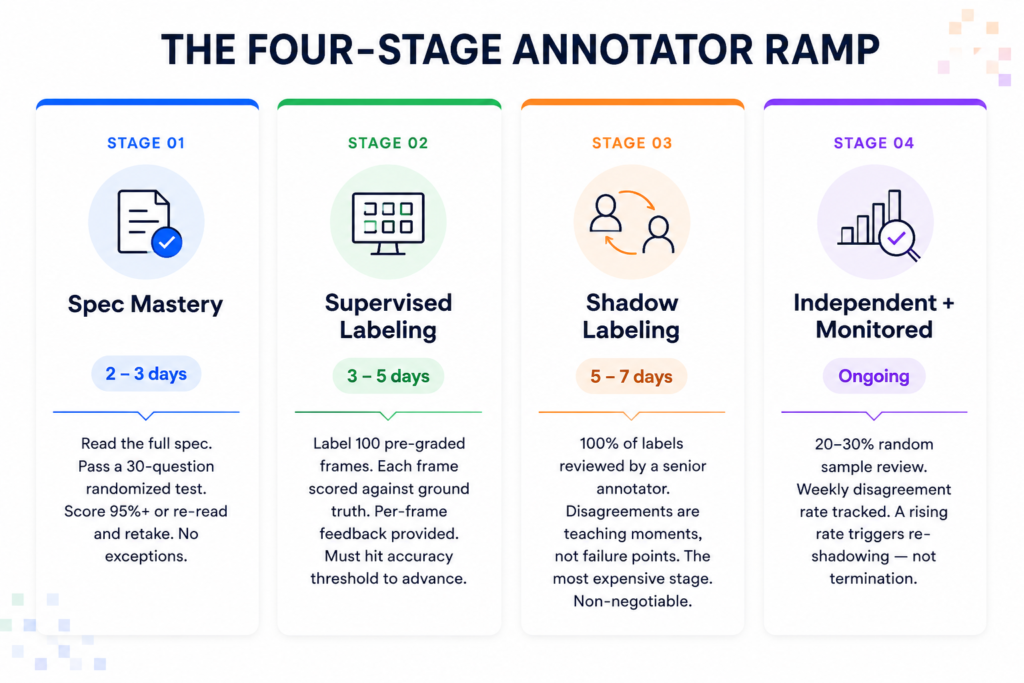
Every annotator working on a hard domain at Pixel Annotation goes through a structured ramp. No shortcuts. No exceptions. Here is exactly what that looks like.
Stage 1: Spec Mastery
Before an annotator touches a single frame, they read the full annotation spec for their domain. For complex domains like medical imaging or autonomous driving, this can be a 40–60 page document covering class definitions, edge-case handling rules, ambiguity conventions, and labeling hierarchy.
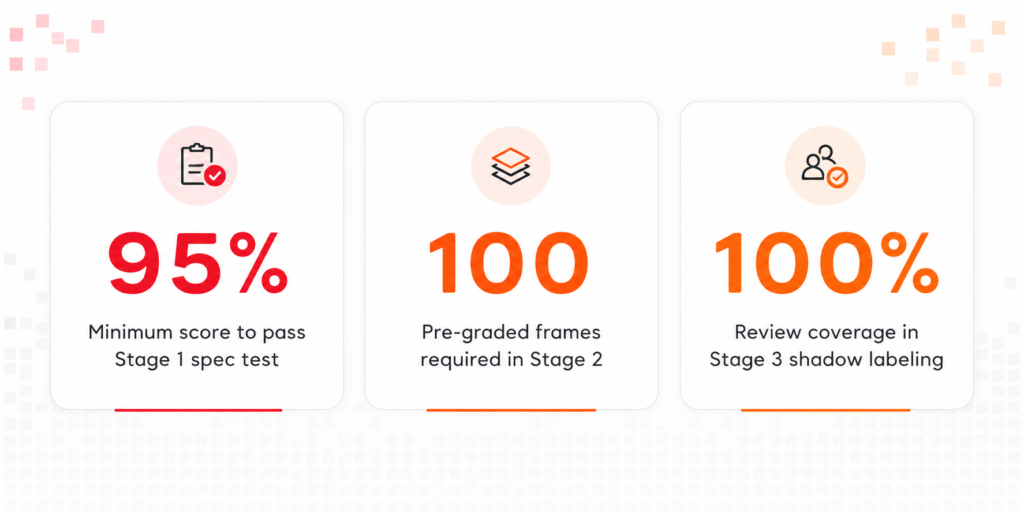
After reading, they take a 30-question test — auto-graded, randomized, question order and answer options shuffled each time. Minimum passing score is 95%. Fail and you re-read and retake. There’s no shortcut through this stage.
This stage alone filters out annotators who skim specs. In our experience, roughly 20–25% of annotators who were confident on intake fail the first spec test on a hard-domain project. That’s not a failure of the test. That’s the test working.
Stage 2: Supervised Labeling on a Graded Set
This is where most vendors cut corners — and where we don’t.
The annotator labels 100 pre-graded frames. These are frames we’ve labeled internally with verified ground truth. Their output is scored frame by frame. They see exactly where they diverged from ground truth and why.
This stage isn’t about passing a number. It’s about building calibration. An annotator can score 93% accuracy and still be deploying a consistent systematic error — for example, drawing polygons 2–3 pixels too tight on every instance of a specific object class during image segmentation tasks. That kind of bias has to be caught at Stage 2, because by Stage 3 it becomes a review burden, and by Stage 4 it ships.
They cannot proceed until they hit threshold accuracy. For most hard domains, that threshold is 90–92% IoU on image segmentation tasks, higher on classification attributes.
Stage 3: Shadow Labeling Against Senior Reviewers
This is the most expensive stage. It is also non-negotiable.
For the first week on a live project, 100% of the annotator’s output is reviewed by a senior reviewer. Not sampled. Not spot-checked. Reviewed completely.
Every disagreement between the annotator and the reviewer becomes a teaching moment. The annotator gets written feedback on each disagreement — not just “wrong” but why it’s wrong, what the spec says, and what the correct interpretation should be.
Senior reviewer time is the most constrained resource in any annotation operation. This is why most vendors skip Stage 3 — it’s expensive in the short term. But an annotator who enters production without Stage 3 is carrying interpretation errors that will silently degrade your dataset for months.
Stage 4: Independent Labeling with Sampled Review
Once an annotator completes Stage 3 without a rising disagreement rate, they are production-certified. Review rate drops to 20–30% on a randomized sample — not the same frames each time.
Their disagreement rate is tracked weekly. Not monthly. Weekly. If we see a rising trend over two consecutive weeks, that annotator goes back to shadow mode. Not retrained from zero. Not terminated. Re-shadowed — which usually catches a specific drift pattern in under three days.
Why Most Operations Skip Stage 2 or Stage 3
The honest answer is cost pressure.
Stage 2 requires a bank of pre-graded frames — ground truth labels created by senior annotators, which means you’re paying for work that never ships to the client directly. Stage 3 requires senior reviewer time at 100% coverage for a full week per annotator. Both of these are line items that don’t show up in a per-label quote.
The math seems to favor skipping them. Until you look at the actual cost of not doing them.
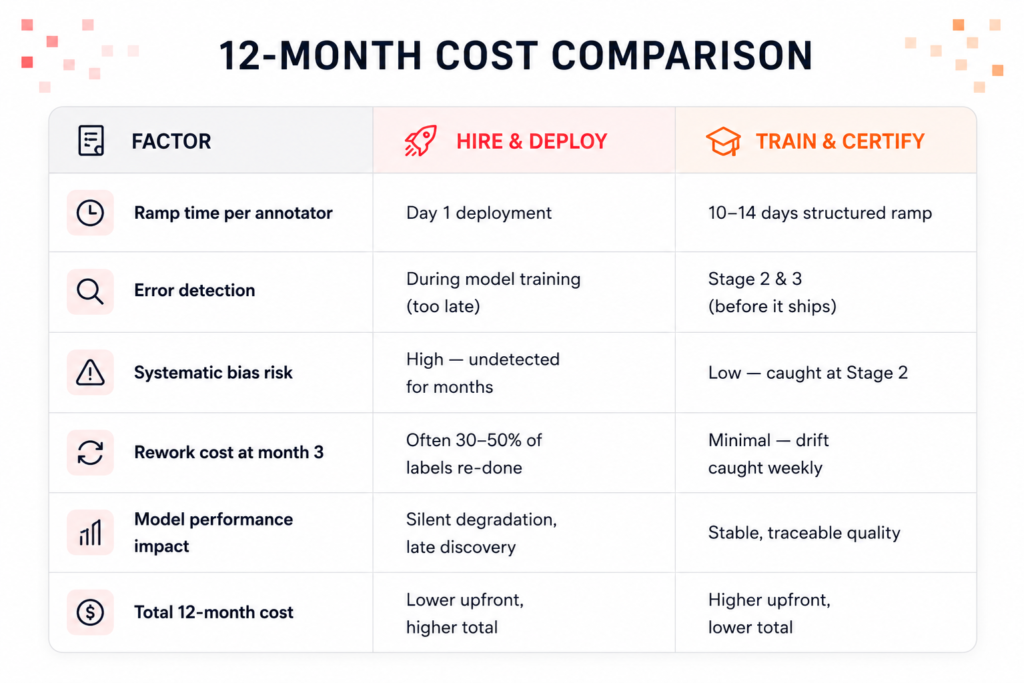
Skipping Stage 2 saves roughly one week of senior reviewer time. If a dataset has to be re-labeled at month three because systematic errors propagated through, you’re paying for the same work twice — plus the cost of diagnosing what went wrong.
REAL EXAMPLE: We inherited an image segmentation dataset from a team that had used a large marketplace vendor. The labels looked correct on spot-check. But instance boundaries on heavily occluded objects were consistently tight by 4–6 pixels — not enough to trigger a human annotation QA flag, but enough to damage IoU scores at training time. That error was a Stage 2 miss. A graded set would have caught it in week one. Instead, it propagated across 80,000 frames.
Training Is Different for Hard Domain
The four-stage ramp is the framework. What goes inside each stage depends heavily on the domain. Here’s what changes when the domain is genuinely hard.
- Medical Imaging
Annotators go through a structured primer on anatomy relevant to the dataset. An SME session with a radiologist or clinician is standard. Image annotation spec tests include ambiguous margin scenarios, multi-class lesion overlap, and DICOM-specific metadata conventions. Reviewers must have completed a minimum number of medical annotation hours before they can review — not just label. - Autonomous Driving
Training includes occlusion conventions (how much of an object must be visible before it gets a label), night-scene contrast calibration, lane ambiguity rules at intersections, and temporal consistency — same object ID across frames. Stage 2 graded sets for image segmentation and bounding boxes include dense traffic and partial occlusions, which is where systematic errors appear fastest. - Sports Analytics
Annotators are trained on camera angle conventions, motion blur thresholds for ball tracking, player overlap rules, and rally/possession segmentation logic. Event image annotation — the difference between a “shot attempt” and a “pass” in contact moments — requires video-level spec training that most general annotators have never encountered. - OCR & Documents
Training focuses on field normalization conventions, layout variance handling, handwriting ambiguity rules, confidence scoring standards, and how to handle partially visible or degraded text. A graded set for OCR AI data annotation typically includes noisy scans, mixed handwriting/print, and multilingual fields — the exact conditions that break models trained on clean-document datasets.
The Senior Reviewer Pipeline
Most people assume the best annotator is the fastest annotator. At Pixel Annotation, that’s not how we build reviewer pipelines.
Senior reviewers are selected on two metrics: spec-comprehension score (how consistently their decisions match the spec’s intent, even in edge cases) and review-flip rate (how often a decision they made in review gets overturned in a calibration session).
Speed is irrelevant at the reviewer level. A reviewer who is 20% slower but produces 30% fewer flip-worthy decisions is a far more valuable operational asset. Reviewer errors have a multiplier effect — they don’t just affect one label, they affect every annotator they’re training.
The reviewer career path is its own discipline at Pixel Annotation. Reviewers go through spec author sessions. They participate in edge-case documentation. They build the calibration sets that Stage 2 annotators are tested on. This isn’t a promotion path — it’s a parallel specialization track.
Production Accuracy Requires Continuous Calibration
Even a production-certified annotator who passed every stage will drift over time. It’s not negligence. It’s a natural pattern in any repetitive high-judgment task. Interpretation conventions that feel sharp in week one start to blur by week eight. Boundaries get slightly looser on image segmentation tasks. Edge-case decisions start to follow habit instead of spec.
This is why every production-certified annotator at Pixel Annotation completes a monthly mini-calibration set — our core annotation QA mechanism for catching drift before it reaches your training data. It’s a smaller graded batch — typically 20–30 frames — scored against ground truth. The output isn’t just a pass/fail. It’s a drift profile.
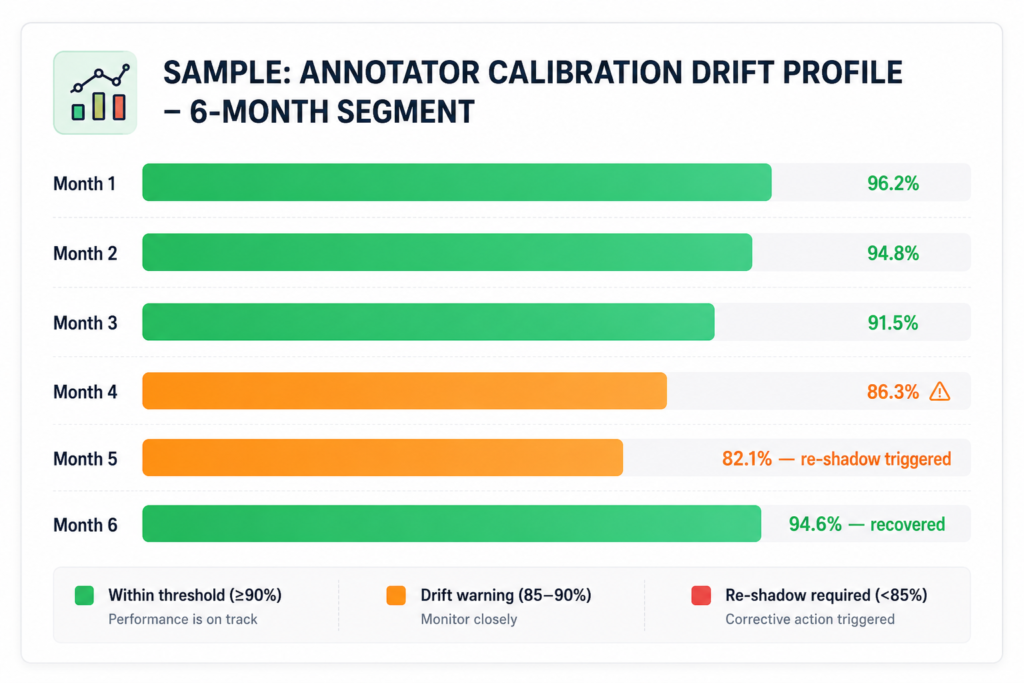
In the example above, the annotator’s accuracy dropped steadily from month three onward. By month five, we triggered a re-shadow protocol — three days of full-coverage review with targeted feedback on the specific attribute where drift occurred. By month six, accuracy was back above 94%.
If we weren’t running monthly calibration, that drift would have continued undetected. By month eight, you’d have a dataset with a quality problem that looks like a model problem.
WHY THIS MATTERS FOR YOUR MODEL Drift that ships looks like model instability. Teams spend weeks tuning hyperparameters, adjusting augmentation, revisiting architecture — when the actual issue is annotation quality that degraded silently at month four. Calibration systems exist to make that problem visible before it reaches training.
Want to See Our Training Program in Action?
We’ll walk you through our domain certification process, show you a live calibration report, and explain exactly how we’d ramp an annotator team for your specific data type.